
Progress and costs#
Progress#
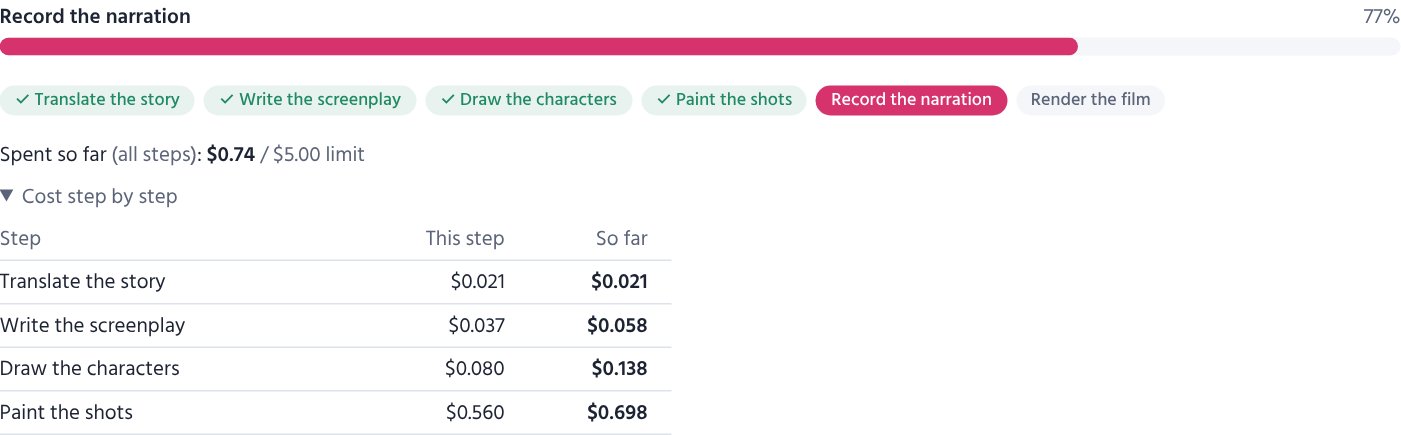
The Progress tab shows each step as it runs (pictures 12 of 40 …) and the cost so far.
Spent so far (all steps) always adds up every earlier step and every earlier run — a film that paused for a check and goes on does not start again from zero. Below it, Cost step by step lists each finished step with its own cost and the total up to that step. A step that stopped half-way and was finished later shows both runs together. The command window and the “Details” log show the same after every step (Cost of this step … · all steps so far …).
| Button | What it does |
|---|---|
| Pause | stops after the current step; Resume goes on from there |
| Cancel | stops; finished work is kept, so starting again does not pay twice |
| Make again | after changes on the Script, Shots or Music page |
Work that is already done is never paid for twice: pictures, voice and clips are kept and reused.
When the film stops by itself#
- Budget reached — raise the budget on the settings page and resume, or make fewer shots.
- Daily limit of an AI (for example Gemini's free daily quota) — the page counts down to when it can go on; press Resume then.
- No balance left at an AI — with use the next AI that has a key on, the next one takes over and the progress page says so; otherwise the film waits.
- Failed — the message says what went wrong; most problems are a missing or wrong key.
The page also warns about things the film went on without: for example The font “…” was not found, so the video uses another one — check the font's name on the settings page, or add the font (Settings → Fonts).
What costs what (approximate)#
| Item | Price |
|---|---|
| Picture (Gemini, 1K) | about $0.04 each |
| Character portrait | one picture each |
| AI picture check | a fraction of a cent per picture (+ one picture when painted again) |
| Script, translation, publishing words | a few cents |
| Free voices (Edge) | $0 |
| Google Chirp 3 HD | 1 million characters a month free, then about $0.025 a minute |
| Gemini 3.8 Flash voice | about $0.015 a minute (about $0.028 from 2027) |
| Sarvam Bulbul | about $0.03 a minute |
| AI motion | by the second; shown on the Shots page |
| Sample shots | three pictures (about $0.12) |
| Recitation director (poems) | a cent or two a poem |
| Your own recitation as a poem's voice | $0 |
| Example pictures of the styles (admin, once) | 13 pictures |
For a 5-minute film the pictures are most of the cost (about 35–45 pictures). The voice is cheap: recording a whole 5-minute narration again costs about $0.08 (Gemini) or $0.15 (Sarvam), and pictures are never remade when only the voice changes.
What is left on your AI accounts#
Settings → AI balances shows what is left where the company tells it: OpenRouter and DeepSeek. Google (Gemini, Chirp), OpenAI, Anthropic and Sarvam show it only on their own pages — the list links there. A balance under $1 is marked low.
- Films made on your PC: the Studio Agent asks with the keys on your PC and sends only the numbers (never a key), every 30 minutes and when you press Check now.
- The same section shows what your films cost this month by the studio's own count.
- On the PC:
run.bat balances.
Saving money#
- Try new settings with a short test story and free test pictures first.
- Not sure about a picture style? Paint sample shots (three pictures) before the whole film is painted.
- In a finished film, paint again only the weakest pictures (Shots page), not all of them.
- Make other languages from a finished film: the pictures are reused for free.
- Use 720p for quick tests; sizes of the same shape share their pictures.
- Keep Draw each main character first on: fewer wrong faces means fewer pictures painted again.